
IESCO Bill Check Online 2026: View Duplicate Bill & History
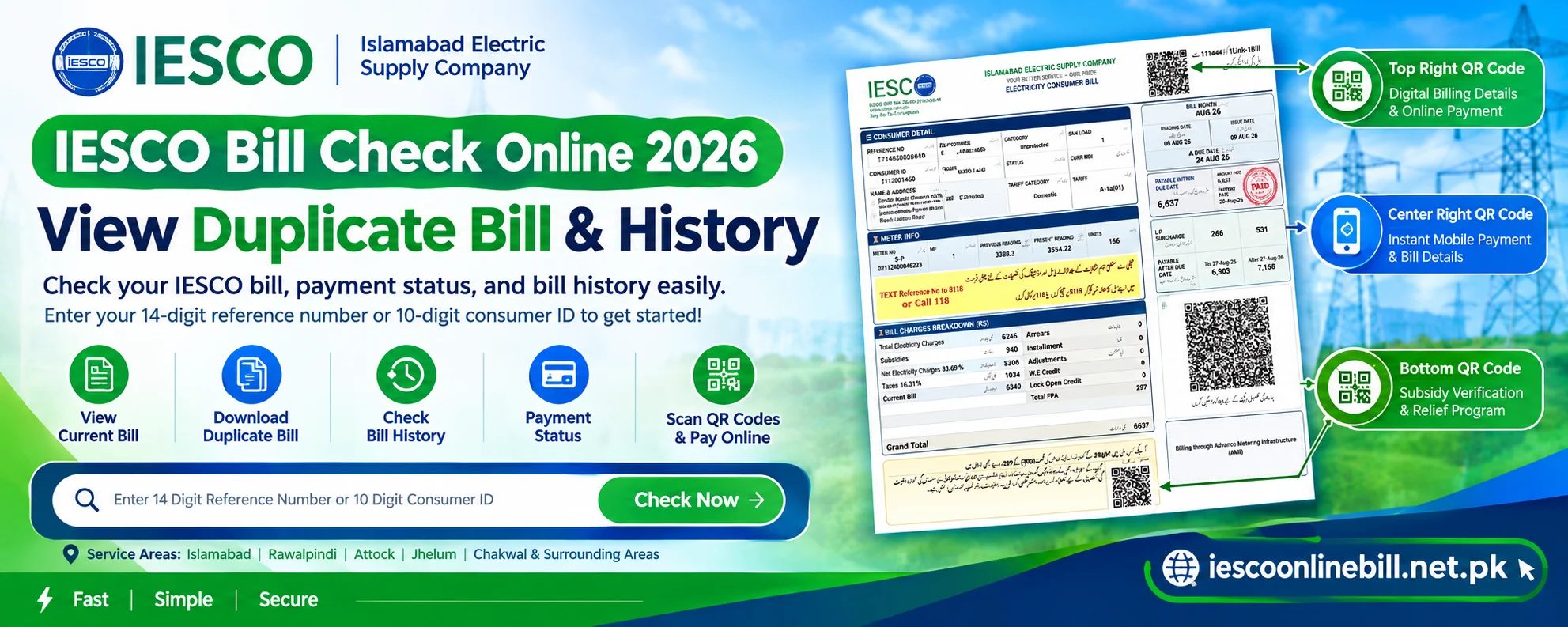
If you're also an IESCO company customer and want to check or pay your bill online, you've come to the right platform. Here, you just need to enter your 14-digit reference number or 10-digit consumer ID in the provided bill checker box, and you can easily view your Iesco Bill duplicate statement.
This is a simple online portal created especially for consumers in Islamabad, Rawalpindi, Attock, Jhelum, Chakwal, and their surrounding areas, where you can instantly view your bill without any login, account, or password. In addition, if you want to find out your current month's payable bill, check your meter reading, or use the three new QR codes added by the government in May 2026 to check payments and subsidies and to pay your bill online through JazzCash/easypaisa and bank apps, all of this is explained to you in detail with step-by-step instructions.
Check IESCO Online Bill Step-by-Step Complete Guide
Now it's very easy to check and pay your IESCO electricity bill online. Because now you don't have to wait for the bill copy, you just need to enter the reference number or customer ID, and your IESCO online bill will instantly appear on your screen. If you don't know how to check your bill online, don't worry, just follow the steps below to view, download, or print your duplicate bill.
Check Bill by Reference Number
- Find the reference number: First, copy the 14-digit reference number from the top left corner of your previous bill.
- Enter the number in the toolbox: Then enter these 14 digits without any spaces or dashes into the search box provided above.
- Select area: Then select ‘U’ or ‘R’ according to your area. If you live in an urban area, select ‘U’, and if you live in a rural area, select ‘R’.
- Check now: Then click the ‘Submit’ or ‘Check Now’ button. Your new bill will be displayed.
Check Bill by Consumer ID
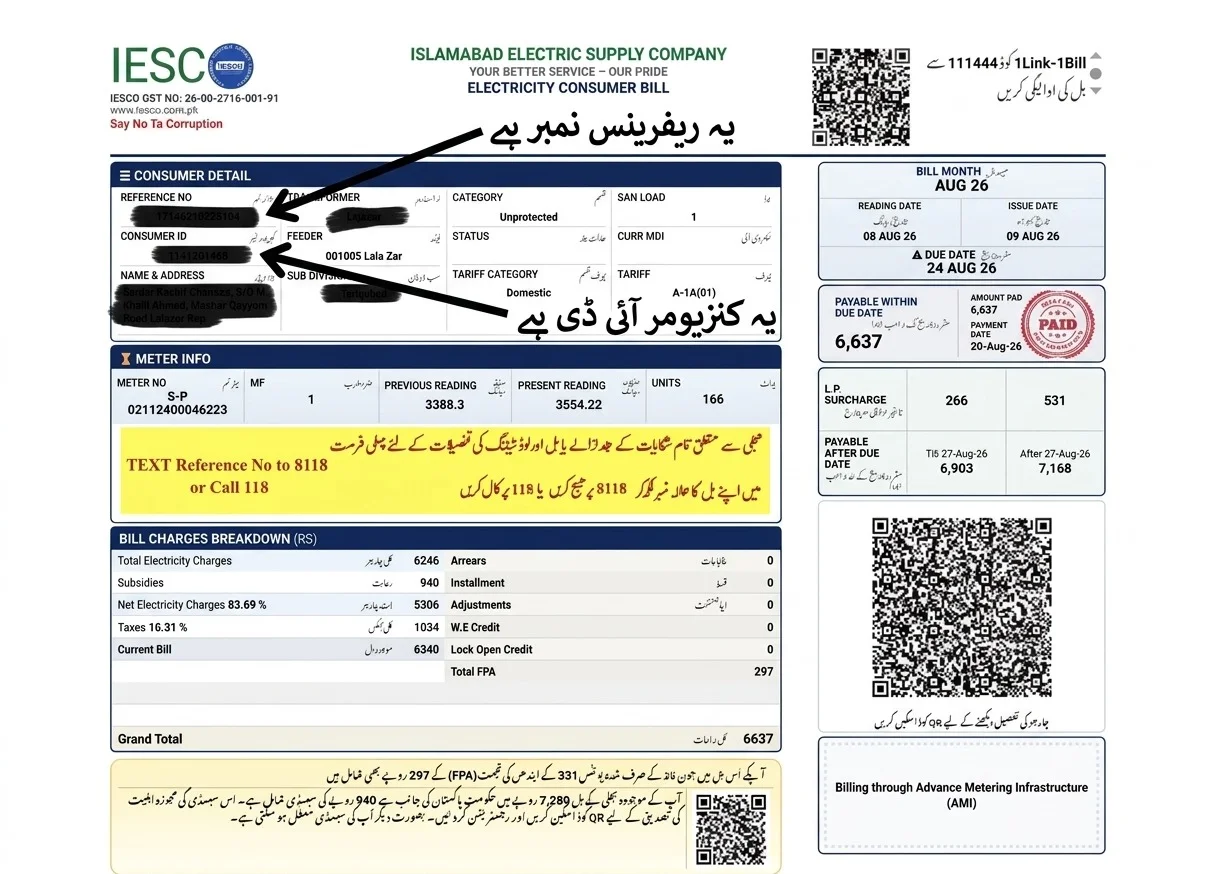
- Find Consumer ID: This is also present on your bill in the top left corner as a 10-digit number where the consumer ID is clearly written. You can also see its exact location in the picture provided.
- Bill Checker Box: Then enter your full 10-digit ID into the bill checker tool provided above.
- Search: Then click “Check Now.” As soon as you do, your correct and up-to-date bill will appear on the screen without any errors.
View, Download and Print Your Bill
After entering the Reference Number or Consumer ID, as soon as you click, your complete bill will open on the screen.
Click on the “Download” or “Print” option at the top of the bill.
As soon as you click, a duplicate of the bill will be saved in the Documents folder under the File Manager on your phone's storage. You can open it at any time and print it.
Additionally, on a PC or laptop, you can save it, or you can press Ctrl+P on your keyboard or click the print button, and save this file under the name “iesco duplicate bill.”
Understanding the 3 New QR Codes on the IESCO Bill 2026
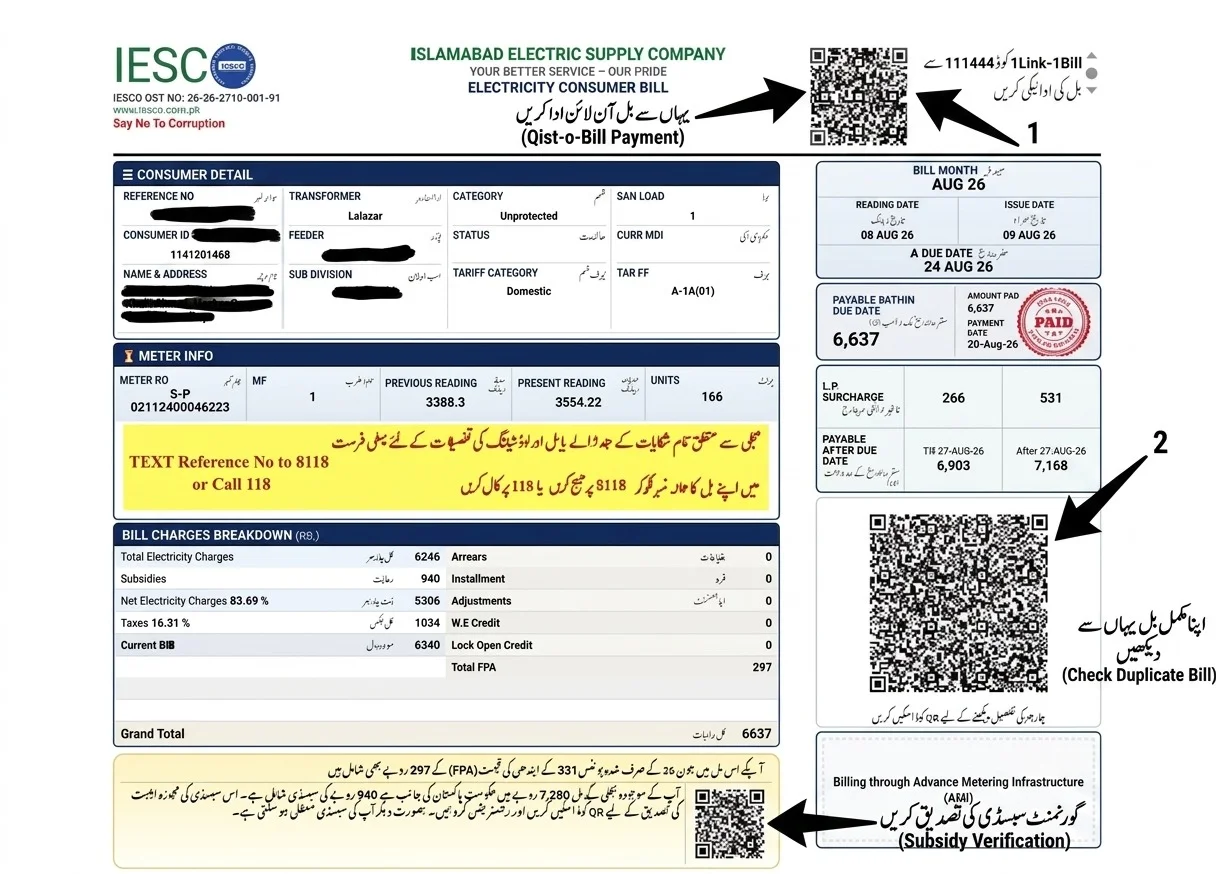
The Government of Pakistan released a new simplified electricity bill format in June 2026 featuring three distinct QR codes. Learn their exact locations, purpose, and instant mobile usage guidelines below.
1. Top Right QR Code
Digital Billing Details & Instant PaymentLocated right at the top right corner of the bill next to the 1Link-1Bill ID. Opens a direct mobile payment link for instant online billing.
2. Center Right QR Code
Mobile Bill Verification & Meter PicturePositioned in the middle-right area above your digital meter picture. Instantly displays your current month's payable amount and meter reading verification.
3. Bottom Center QR Code
Subsidy Verification & Relief 2026The most important QR code located in the lower middle. Eligible consumers using over 200 units can apply directly for government subsidy relief.
Areas Covered by IESCO Company (List of Service Areas)
Islamabad Electric Supply Company (IESCO) supplies electricity to five major districts of Pakistan and their surrounding areas, tehsils, and well-known housing societies. If you belong to any of the areas listed below, you can check your online duplicate bill here completely free of charge.
| IESCO Region / Circle | Districts & Tehsils Included | Famous Localities & Housing Societies |
|---|---|---|
| Islamabad Circle | Islamabad Capital Territory, Barakahu, Nilore. | Blue Area, G-Sectors, F-Sectors, I-Sectors, E-Sectors, Bani Gala, Gulberg Green, DHA Islamabad, Bahria Town (Phases 1-8). |
| Rawalpindi Circle | Rawalpindi City, Rawalpindi Cantt, Gujar Khan, Taxila, Murree, Kahuta, Kallar Syedan. | Saddar, Satellite Town, Commercial Market, Westridge, Adiala Road, Rawat, Lalazar, Chaklala Scheme, Shamsabad. |
| Attock Circle | Attock District, Hasan Abdal, Fateh Jang, Pindi Gheb, Jand, Hazro. | Attock Cantt, Kamra Cantt, Gondal, Sanjwal, Lawrencepur, Taxila Bypass. |
| Jhelum Circle | Jhelum District, Pind Dadan Khan, Sohawa, Dina. | Jhelum Cantt, Civil Lines, Mangla Cantt, Khewra, Machine Mohallah, Shandar Chowk. |
| Chakwal Regional | Chakwal District, Talagang, Choa Saidan Shah, Lawa. | Talagang Road, Bhoun Chowk, Balkassar Interchange, Kallar Kahar, Dhudial. |
Exact Location of IESCO Reference Number and Consumer ID
Often, users get confused between the Reference Number and the Consumer ID when checking their bill online. But not anymore, because here we've included a picture of the bill for your convenience, so you can see exactly where both are written. If you still can't make it out, just refer to the locations we've indicated. And the difference between the two is given below, so you can see which is the reference number and which is the consumer ID.
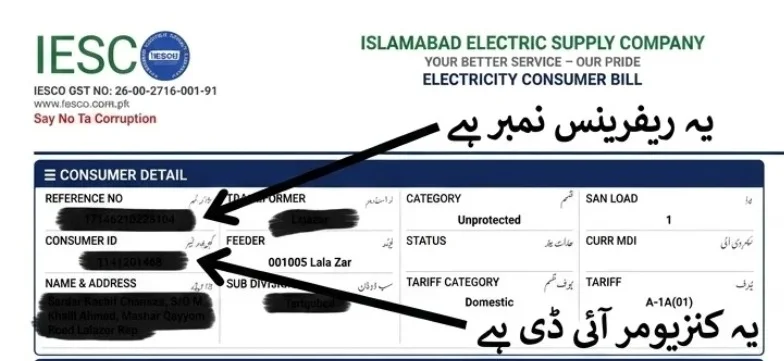
Reference Number (14 Digits)
This is the number written inside the box containing the Consumer's Details at the top left of your bill. It is clearly printed in English as the reference number, and its most distinguishing feature is that it consists of a full 14 digits (17140000000000).
Consumer ID (10 Digits)
This is also written in the same consumer details box just below the reference number. Its identifying feature is that it consists of only 10 digits, and it is clearly labeled as the Consumer ID (111200000).
How to Get Your IESCO Bill Without a Reference Number
If your bill is lost and you don't have a reference number, you can find your bill using the easy methods provided below.
Check Your Previous IESCO Online Bill
- Step 1: First, open EasyPaisa, JazzCash, or your bank app on your mobile phone.
- Step 2: Then go to the app's “Transaction History” or “My Bills” section.
- Step 3: There you will find the previous month's bill payment slip, which already has the 14-digit reference number saved. You can copy that number from there to check your IESCO bill.
Find Your Bill Using Available Consumer Details
- Step 1: If you do not have the previous bill, please note the Meter Serial Number written on your meter or take a picture of it.
- Step 2: Then call IESCO's helpline at 118 or visit your nearest Customer Service Center in person. Provide them with this information, and they will immediately assist you and resolve your issue. They will quickly find and provide you with a reference number.
Can You Check an IESCO Online Bill by Name, CNIC, or Meter Number?
Many people ask if they can check their bill using their CNIC and whether their online bill can be generated. The clear answer is absolutely not, because IESCO does not allow this method because there's a risk of leaking your personal privacy details. That's why, with millions of people sharing the same name in Pakistan, after every user started checking their bill with their name, they wouldn't even find the correct billing company. To avoid this confusion, you cannot check your bill using your name and CNIC because this is against IESCO's policies. Besides, they don't provide any such option on their official website for checking.
What to Do If You Have Lost Your Bill Details
If you've also lost your bill, don't worry. Just follow these steps to get your new bill.
- Step 1: Check your neighbor's bill for their Sub-Division Code, because adjacent houses often share the same code. For example, if their code is 101, yours will almost certainly be 102.
- Step 2: Take the serial number written on your meter and that subdivision code, and call the IESCO helpline. Or, write down the reference number of a nearby house exactly as it is, and if their code is 103, you can automatically search for 104, and your bill will appear.
Understanding Your IESCO Bill
You should know exactly which taxes are added to and deducted from your bills. In addition, it's important for you to know how many units you've consumed and where that information is written. As a responsible consumer, you must understand the entire layout of your IESCO bill.
People often have the misconception that the government arbitrarily collects taxes and that the bills of the rich are paid by the poor. That is not the case at all. Instead, the government levies a tax on the wealthy who use more electricity, and those funds are given back to the poor as a form of relief on their bills.
Consumer and Connection Details
At the top left of the bill, in a blue box, your name, home address, Reference Number, and Consumer ID are printed, which identify your connection. This way, the ESCO knows which city or town you live in, which street, and which house.
Meter Number, Reading and Units
In this section, you'll find your meter's unique serial number. Alongside it are the “Present Reading” (for this month) and the “Previous Reading” (from last month). By subtracting the latter from the former, you calculate the total units consumed, which are shown here.
Bill Date and Due Date
“Issue Date” means the date on which the bill was generated, and “Due Date” is the final date by which you must pay the bill to avoid penalties.
Current Charges and Total Bill Amount
“Current Charges” means only this month's electricity cost and taxes. “Payable Within Due Date” is the total amount you must pay by the due date.
Previous Balance and Payment Details
If you have any outstanding bill from the previous month, it is shown in this section under “Arrears.” Alongside it, the date and amount of the previous payment are also listed, which you must pay along with this month's bill.
Taxes, Surcharges and Other Charges
This section contains government-imposed taxes such as GST (18%), FC Surcharge (Rs. 3.23 per unit), and FPA (Fuel Price Adjustment) details, which increase the bill amount.
Important Terms and Codes on Your Bill
The bill indicates your consumer status as “Protected” or “Unprotected.” If you use fewer than 200 units continuously, you are classified as Protected and receive subsidized electricity, and you are also eligible for the subsidy relief scheme.
How to Check Your IESCO Bill History
Checking your IESCO bill history is very easy. If you want to get the details of your previous bills, you can view them using the method provided below.
Enter ID
Enter your 14-digit Reference Number or 10-digit Customer ID in the input box.
Check History
As soon as the bill appears on the screen, look directly to the lower left side. You will see a bill history box showing billing data for the past 12 months (1 year).
Data Details
This history will also include the units consumed each month, the bill amount, and the payment dates, which you can view as well.
IESCO Bill Paid and Unpaid Payment Status
After making your IESCO online bill payment, it's important to check whether the funds have been transferred. To check the bill payment status, you can use the official IESCO website or your banking app. Enter your reference number in the tool above and check. On the bill, right below the QR code box, it will clearly show “Paid” or “Unpaid.”
If you have paid the bill and it still doesn't show “Paid,” first wait 24 hours. Often, when you pay a bill online, there can be a temporary network glitch. If, after waiting that long, the status still doesn't show, call the helpline immediately or go to your nearest ESCO office to have your issue resolved.
How to Pay Your IESCO Bill Online
You can now pay your IESCO bill online from home. There's no need to go to the bank. Just follow the simple steps provided.
Method 1: Mobile Wallets
Open the EasyPaisa, JazzCash, or Nayapay app on your phone -> Bill Payment -> Electricity -> IESCO -> Enter the Reference Number and pay your bill.
Method 2: Banking Apps
Log in to your bank's app (HBL, UBL, Meezan, etc.) on your mobile -> Select Utility Bills -> Enter the details and make the payment.
Method 3: Credit/Debit Card
Visit the official IESCO website or your bank's payment gateway and pay your bill online within 2 minutes by entering your card number directly.
Method 4: ATM Banking
Go to any nearby ATM -> Select the Utility Bill option -> Enter the reference number and pay the bill with cash or from your account.
IESCO Bill Not Showing Online
Many IESCO customers complain that when they check their bill online, they get a “bill not found” message or some other error. If you're facing this problem repeatedly, follow the instructions provided below, and you will no longer have this issue.
Incorrect Reference Number
Check that all 14 digits are correct and don't forget to include a “U” or ‘R’ at the end. If even one digit is wrong, “Bill Not Found” will be displayed.
Server Down/Maintenance
When many people check their bills on PITC or IESCO at the same time, their server can temporarily go down due to heavy load or updates. This is why you get an error.
Billing Cycle Delay
At the beginning of the month, when new bills are being generated, it takes time for data from some areas to upload. So if you get any error, don't worry and just wait one day and check again, and your bill will show up.
Internet issue:
When you check your Eesco bill, always check your internet connection first, because a slow connection can also prevent your bill from displaying.
FAQs About the IESCO Bill
Frequently asked questions and official guidelines for IESCO electricity consumers.
Ans: No, that goes against IESCO's policies, and there is no option to check a bill by name on their portal. To view the bill, you need the 14-digit Reference Number or the 10-digit Customer ID.
Ans: No, IESCO has not yet provided the facility to check bills directly online using a CNIC.
Ans: This is a unique identification number written on your electricity bill in the form of 14 digits. The first two digits indicate your batch, the next four the sub-division, and the remaining numbers your account, which ends with a ‘U’ or ‘R’.
Ans: Go to the toolbox at the top of our website or to the official IESCO Portal and enter your 14-digit reference number. Your current duplicate bill will appear on the screen, which you can print.
Ans: In 2026, the easiest way to check your IESCO bill online is by scanning the QR code. You can also check your bill by entering your 14-digit reference number through modern banking apps like EasyPaisa, JazzCash, or Nayapay.
Conclusion
Checking and downloading your IESCO online bill has now become very fast and easy thanks to the new digital system. You just need to scan the QR codes on your bill, and you can check and pay your bill very quickly. You can also see whether your bill has been paid or not. You can download a duplicate of your bill online and save it for yourself so that if IESCO officials ever come to your area or city to conduct a survey and inspection, you can immediately show them your bill.
Our site is not a main website. Rather, we have tried to provide you with real information so that you can understand everything. If you are still confused about anything, please follow the details given above step by step. Also, the bill checker box provided above is completely real and authentic. You can enter your reference number or consumer ID as instructed and click “Check Now.” You will be taken directly to the official site, where your latest IESCO bill will be displayed on the same screen. If you still have any questions, you can contact us in the comment box below. We will respond to all inquiries. I will try to help and guide you properly.